White-Label Demo Script
A ready-to-use script for presenting branded accounting software and financial services under your own firm's name — from the opening line to the close.
Step 1
Opening Script
Set the tone, establish credibility and make the conversation about the prospect's firm, not ours.
“Thanks for making time today. Before we jump in, I want to confirm the goal of this call: to show you how your firm can offer a branded financial intelligence platform to your clients — without hiring developers, without a six-month build, and without giving up control of your client relationships.”
“Everything you are about to see runs under your firm's name, your colours and your domain. Your clients see your brand. Behind the scenes, Empire AI handles the analysis, the hosting and the updates.”
“I'll run through a short demo, then we can talk about how it fits your client base and pricing. Does that sound good?”
Step 2
The Hook
Ask one high-impact question, then bridge into the demo.
“Quick question: when a client hands you three months of bank statements, how long does it take your team to turn that into usable insight — and how confident is the client that they understand their own numbers?”
“What I'm going to show you turns that manual review into a two-minute upload that produces a branded dashboard and a PDF report your client can actually read. Let's look at it now.”
Save the build cost
A custom platform typically costs £50,000–£150,000 and six to twelve months. White-label gets you live in days.
Keep the client relationship
Your logo, your domain, your reports. Clients never see Empire AI unless you choose to tell them.
Create a new revenue stream
Charge a monthly clarity fee, a per-statement analysis fee, or bundle it into existing advisory packages.
Differentiate the firm
Most accountants still send spreadsheets. You send interactive dashboards and branded PDF intelligence.
Step 3
Branded Dashboard Demo
Walk the prospect through a dashboard that already looks like their firm.
“This is what your client sees after they sign in. Notice the logo in the top left, the colours and the dashboard name — all of this is configured to match your firm.”
"Your client uploads a bank statement, and within seconds the platform shows income, spending, subscriptions, risk flags and net position — all categorised and explained.
"The dashboard updates in real time. If they upload a new statement next month, the trends and comparisons update automatically. Your team does not have to rebuild a spreadsheet every time."
Your Firm
Client Intelligence Dashboard
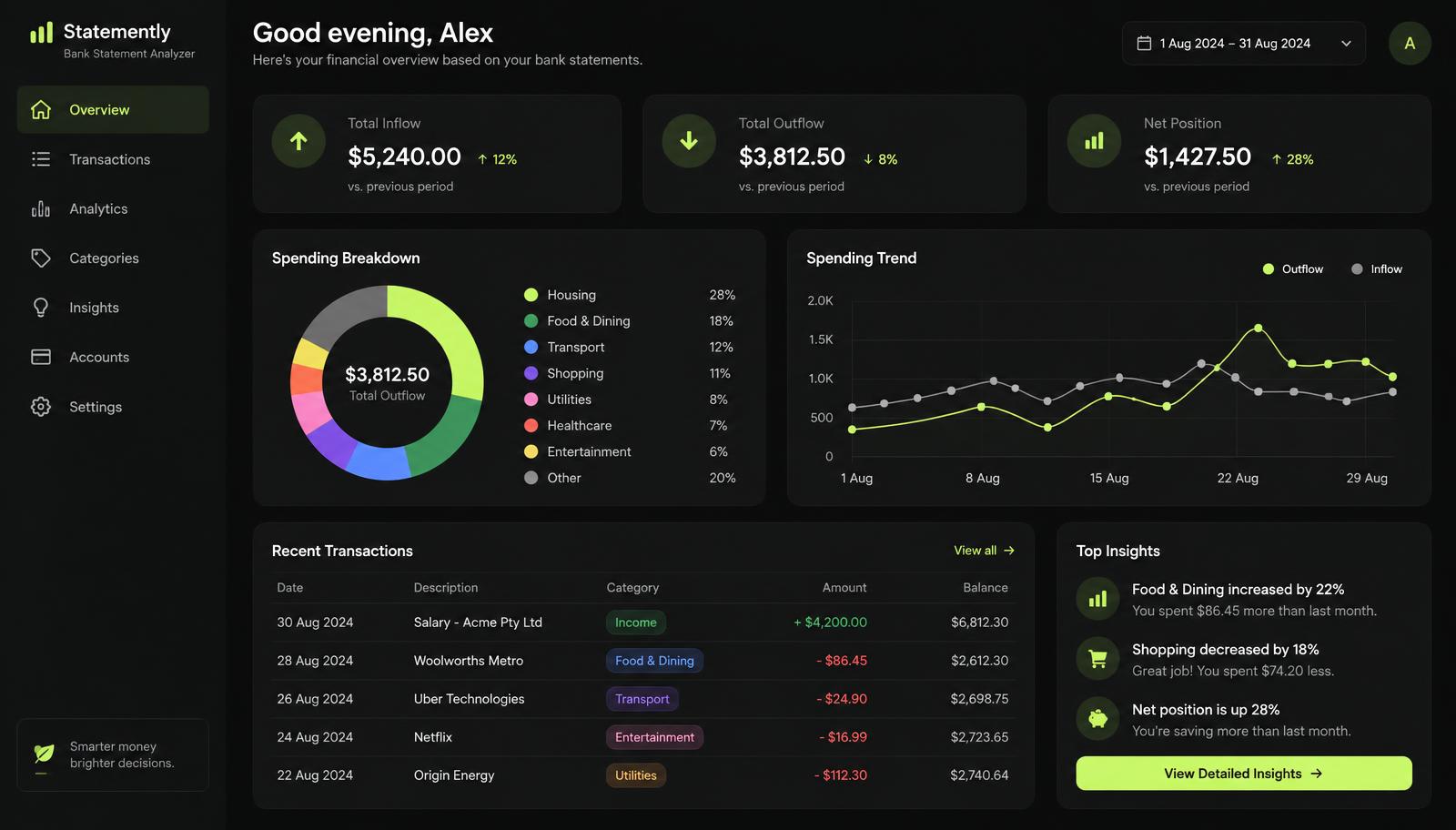
Example branded dashboard preview
Step 4
Core Tools Demo
Show the four tools that turn raw bank data into advisory conversations.
Bank Statement Analyzer
Upload any UK business bank statement. The platform extracts income, expenses, subscriptions and transfers, then flags anything that needs a closer look.
Cash Flow Scoring
The cashflow view shows inflows, outflows and runway. It spots seasonality, spikes and dips so you can advise clients before they hit a crunch.
Profitability Insights
Revenue, gross margin, operating costs and net profit are reconstructed from bank data. This gives you a starting P&L conversation in minutes.
Risk Flags
The risk engine highlights over-reliance on one customer, recurring late payments, thin liquidity and unusual outflows — all in plain English.
Step 5
Branded PDF Reports
Demonstrate the report your client can take away, share or file.
"At the end of every analysis, the platform generates a branded PDF report. Your firm's logo, colours and contact details appear on the cover and every page."
"The report includes an executive summary, category breakdown, risk flags, cashflow commentary and recommended next steps. It is written for the client, not for you — so you can hand it over as a standalone document or use it as the start of an advisory meeting."
"This is the piece that justifies a monthly clarity fee. The client sees value immediately, and your firm is positioned as the expert that delivered it."
Step 6
Accountant Portal
Show how the firm manages clients at scale.
Firm Client Manager
- Each client gets their own isolated workspace.
- Advisers see every client workspace; clients only see their own.
- Team members can be invited with controlled access.
- Statements, reports and notes stay inside the firm's tenant.
"Behind the dashboard is your firm's portal. You can invite clients, assign team members and view every workspace from one screen."
"Each client workspace is isolated. A client cannot see another client's data. Your team can see everything they need to advise, and you can revoke access at any time."
"This scales. Whether you have ten clients or a thousand, the structure is the same — one flat licence, not a per-client tax on growth."
Step 7
Custom Domain
Make the ownership feel real by showing the firm's own URL.
"If you want the platform to feel like a product your firm built, you can run it on your own domain or subdomain — something like insights.yourfirm.co.uk."
"Your clients sign in there, receive emails from there and download reports that carry your URL. To them, this is your technology. To you, it is a fully managed service that we keep secure and up to date."
Step 8
Pricing Overview
Bridge the demo into the commercial conversation with confidence.
"Pricing is straightforward. You pay a flat monthly licence based on your firm size — not per client, not per report, not a percentage of your revenue."
"The Starter tier is designed for a solo adviser who wants to test the offer with a small client base. Professional removes client limits and adds priority support. Enterprise is for firms that want custom domains, onboarding and an SLA."
"Most firms recover the licence cost with their first client clarity fee. The real upside is retention: clients who see their numbers this clearly tend to stay longer and buy more advisory services."
Starter
£49 per month
Solo advisers testing a branded offer.
Professional
£149 per month
Growing firms with unlimited clients.
Enterprise
£499 per month
Established firms needing custom domains and SLAs.
Safety
Trust & Safety
Address compliance, data ownership and scope before the close.
Software, not advice
Empire AI is a software and analysis platform. It does not provide financial advice, execute trades, hold client deposits or promise investment returns. Your firm remains responsible for the advice and decisions you deliver to clients.
Step 9
Closing Script
End with a clear next step and a low-friction way to start.
"So that is the platform. Your brand, your clients, your revenue — and none of the engineering risk."
"The next step is simple. Apply for white-label access, upload your logo and colours, and we will have your branded preview ready within 48 hours. You can show it to your first client before you commit to a higher tier."
"What does your client base look like right now — and how many of them would benefit from seeing their numbers this clearly?"